





I told you that the Windows 11 August 2026 update could break certain games, reboot your PC out of nowhere, and cause other performance issues, including lower-than-usual frame rates. A gaming studio later flagged Windows 11 KB5121003 as the root cause, and Microsoft is now officially investigating the reports after a week of silence.
“Following the release of Windows updates on August 11, 2026 (KB5121003) and later, Microsoft received reports of issues involving an inability to run games as expected,” the company noted in a support document spotted by Windows Latest. “We are presently investigating to determine if this is an issue caused by Microsoft. We will provide an update when more information is available.”
The August 2026 update (KB5121003) rolled out on August 11, bringing the OS to Build 26200.9168 if you are on version 25H2 or Build 26100.9168 on PCs with version 24H2. You can verify the OS build from Settings > System > About. If it matches what I have in the screenshot below, you’re on the August 2026 Update:
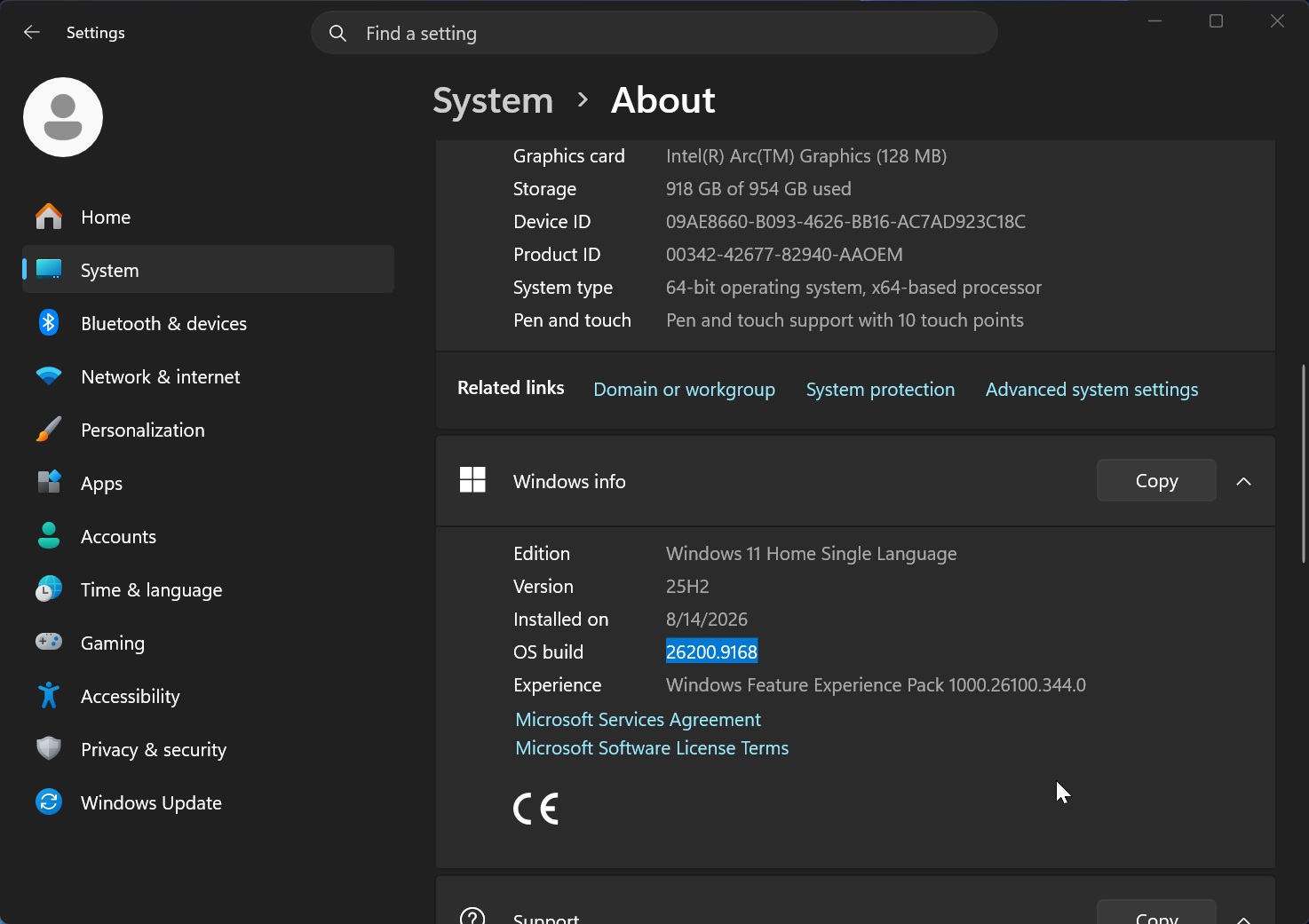
The August 2026 Update sounds like a decent update on paper, and I also did not run into unexpected problems after installing it. But that was until I played ARC Raiders, which would simply crash and reboot Windows.
At first, our assumption was that it was due to Nvidia or some other driver update, but removing Windows 11 KB5121003 fixed the problem.
Windows Latest’s investigation later found that hundreds of gamers had reported similar problems within a few hours, and multiple popular titles were affected, including:
- ARC Raiders
- MARVEL Tōkon: Fighting Souls
- The Finals
I’ve had reports of issues affecting other titles as well, but at this point, it’s confirmed that the above three games are affected. ARC Raiders and The Finals are developed by the same studio, Embark, which later shared more details about what it believes is causing the crashes.
Gaming studio confirms Windows 11 August update broke its games
“We’re aware of a new crash introduced with the release of a Windows update (KB5121003) that may be affecting some of you,” an Embark Studios developer wrote in a message on Discord, as first spotted by Windows Latest. “The team is working on a fix, and we will keep you posted on any updates.”
Embark Studios later narrowed the issue down to a compatibility problem involving inpoutx64.sys, a third-party kernel-level port access driver. It’s not included with Windows and is typically installed by third-party software or hardware utilities. For example, one user told us that the driver had been installed on their PC by Razer’s software.
“This is a crash related to the file inpoutx64.sys, which changed with the Windows update,” Embark noted in a Discord post. “We’re working towards a long-term fix, but in the meantime there is a workaround solution that will safely remove the file in question and allow you to play the game without issue.”
Embark Studios’ finding aligns with our own tests and user reports. After the August 2026 Update shipped, users noticed that ARC Raiders started crashing, while removing the update brought things back to normal.
Affected users have also reported errors such as “Hang detected on GameThread” and EXCEPTION_ACCESS_VIOLATION after Windows 11 KB5121003 was installed.
If you’re affected, Embark’s temporary workaround is to stop and remove the inpoutx64 driver. Open Command Prompt as administrator and type ‘sc stop inpoutx64’. Then type ‘sc delete inpoutx64’ and manually delete the inpoutx64.sys file from C:\Windows\System32\drivers.
It’s still unclear exactly what Microsoft changed in Windows 11 KB5121003 that broke compatibility with inpoutx64.sys, but we now know the driver is involved in at least some of these crashes.
Microsoft is now investigating Windows 11 KB5121003 issues
Given the growing number of reports, Microsoft has now confirmed that it’s aware of the gaming issues and is investigating them. It’s also urging gamers to submit feedback using Feedback Hub so it can identify what actually changed.
Microsoft has not yet confirmed that the problem is caused by Windows itself, which is why its support document says the company is still investigating “to determine if this is an issue caused by Microsoft.”
In addition to game crashes, Windows Latest has also observed issues with Windows Hello on some PCs, with one user noting in an email to Windows Latest:
“After installing KB5121003 (build 26100.9168/26200.9168), Windows Hello PIN sign-in fails on every single reboot, forcing me to reconnect to my Microsoft account to re-enroll the PIN each time.”
“Windows deletes and recreates the key each reboot (different key GUID every time), but the new key becomes corrupted again by the next boot, an infinite loop,” the affected user added.
Microsoft has not confirmed these reports yet.
Should you remove Windows 11 KB5121003?
Regardless of whether you’re affected by gaming issues or other problems, I strongly recommend against removing Windows 11 KB5121003 or any cumulative update unless the problems make your PC unusable.
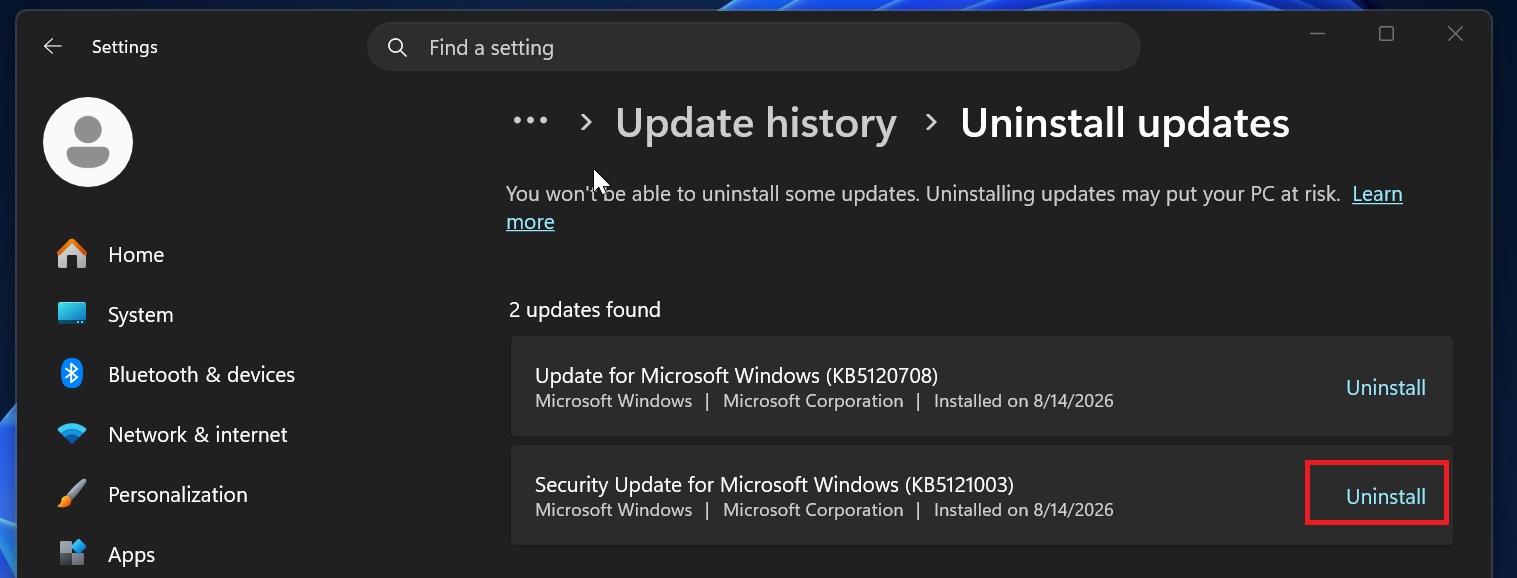
The August 2026 Update addresses more than 400 security vulnerabilities, and Microsoft has warned users against delaying updates past three days.
Windows security threats are only getting worse due to the rise of AI-powered attacks, so you should not remove a security update simply because you’ve heard that others are having issues. If your PC is working normally, your best bet is to keep KB5121003 installed and wait for Microsoft to complete its investigation.